
What Is Google’s New Ask Gemini Feature?
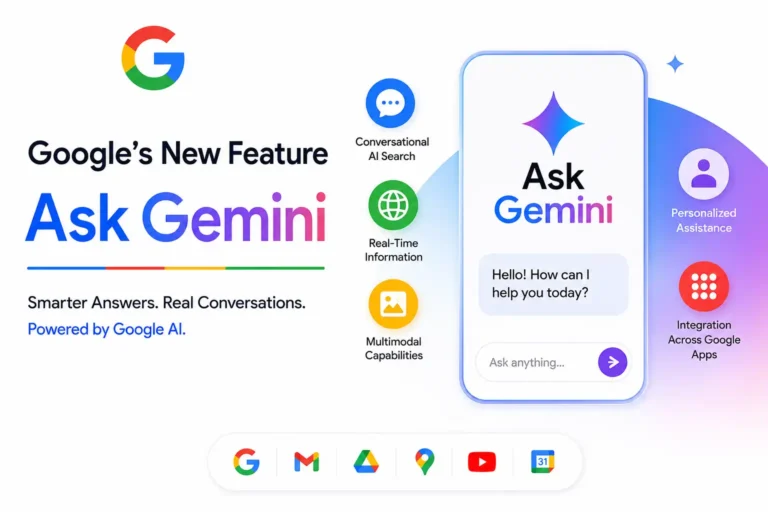
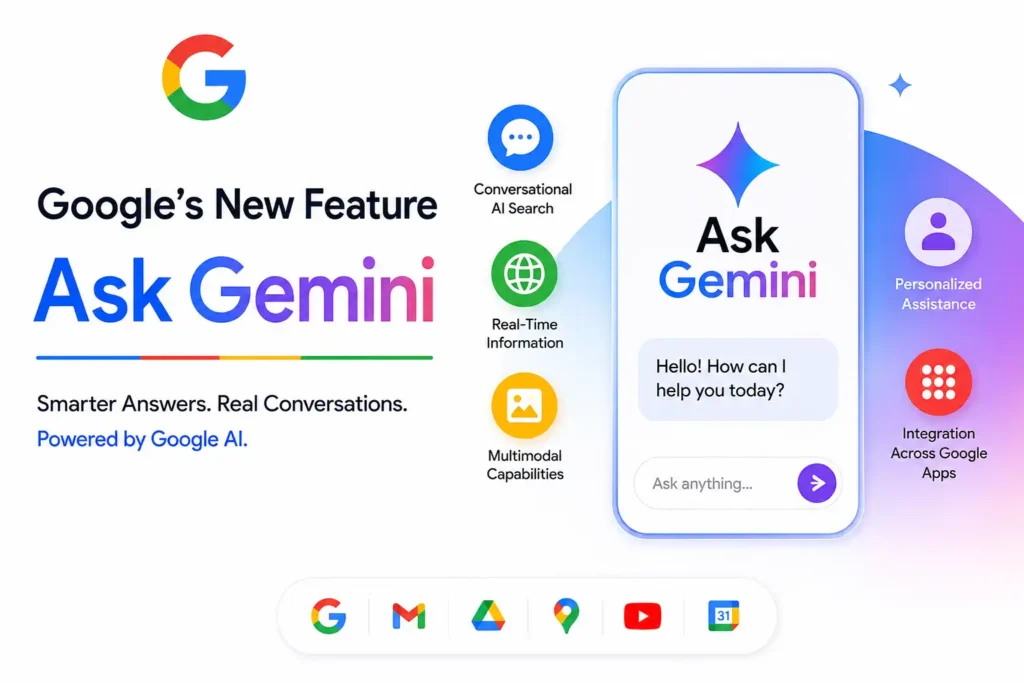
Google’s new Ask Gemini feature is an AI-powered assistant designed to help users get direct, conversational answers instead of simply displaying a list of web pages. Built on Google’s Gemini family of AI models, it can explain complex topics, summarize information, generate ideas, answer follow-up questions, and assist with everyday tasks using natural language. Unlike traditional search, Ask Gemini understands context, making conversations feel more human. It also connects with Google Search and selected Google services to deliver more relevant responses. Google continues expanding Gemini across its ecosystem, making AI a core part of how people search, learn, create, and solve problems.
How the Ask Gemini Feature Works
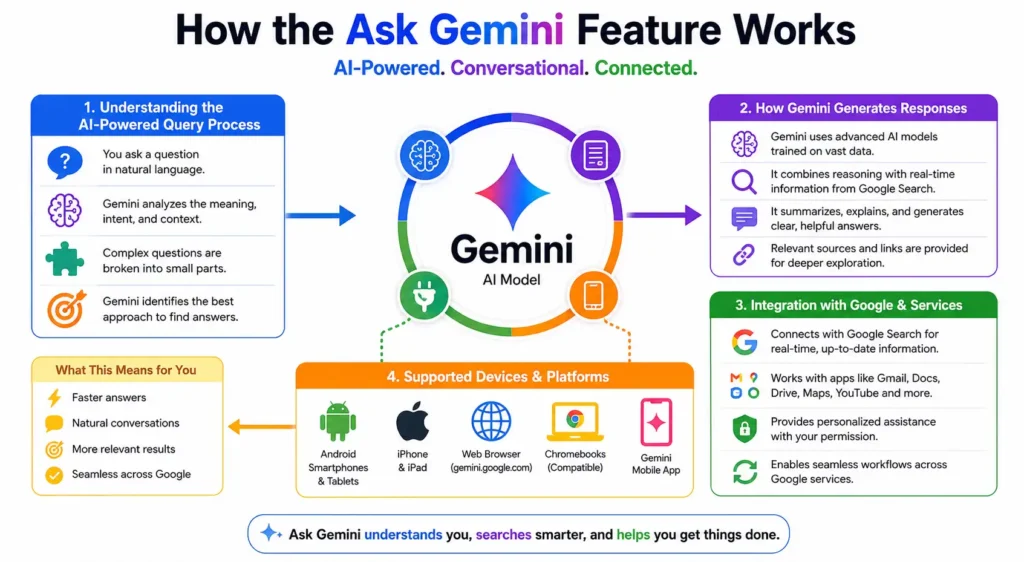
Understanding the AI-Powered Query Process
Ask Gemini begins by analyzing the meaning behind your question instead of focusing only on keywords. Using advanced natural language processing (NLP), it identifies your intent, understands context, and breaks complicated questions into smaller parts when necessary. This approach allows Gemini to provide more complete and relevant answers than a standard keyword search, especially for research, planning, comparisons, and multi-step questions.
How Gemini Generates Responses
Gemini generates responses using Google’s large language models trained on diverse datasets and enhanced with reasoning capabilities. For many questions, it combines AI reasoning with fresh information from Google Search to produce accurate, conversational answers. Instead of copying content from websites, Gemini summarizes information, explains concepts clearly, and often includes helpful links for further reading when appropriate.
Integration with Google Search and Other Google Services
One of Ask Gemini’s biggest strengths is its deep integration with Google’s ecosystem. It works alongside Google Search to retrieve current information while also connecting with services like Gmail, Docs, Drive, Maps, and YouTube where supported and authorized. This integration enables users to complete tasks, retrieve personal information securely, and continue conversations without switching between multiple Google products.
Supported Devices and Platforms
Google has expanded Ask Gemini across multiple platforms to provide a consistent AI experience. Users can access it on Android devices, iPhones, tablets, desktop browsers, and compatible Chromebooks. Many features are also available through the Gemini app and Google Search experiences, although availability depends on the user’s country, language, account type, and device compatibility as Google continues its global rollout.
Key Features of Google Ask Gemini
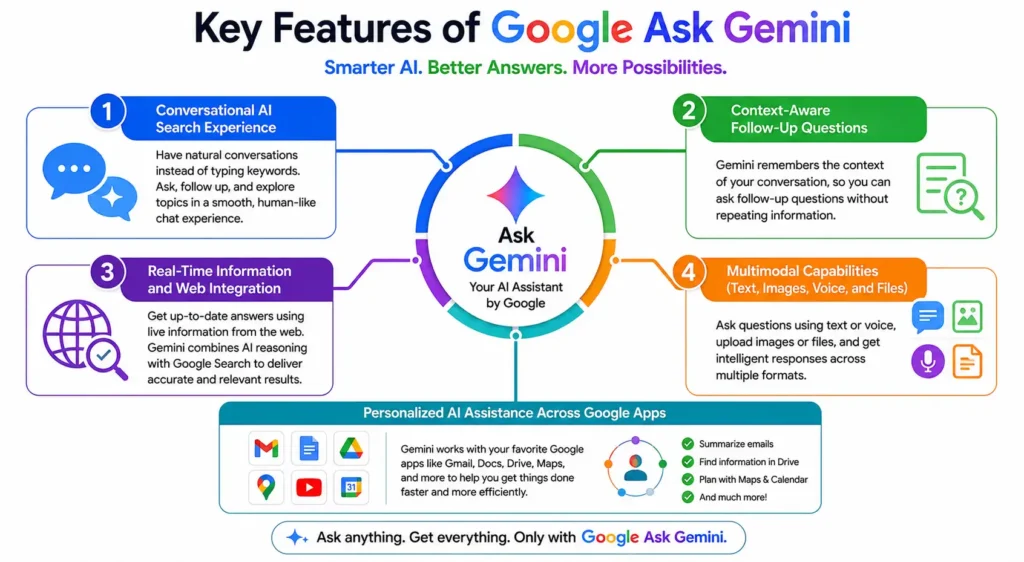
Conversational AI Search Experience
Unlike traditional search engines, Ask Gemini allows users to have ongoing conversations instead of starting a new search every time. You can ask detailed questions, request explanations, refine answers, or switch topics naturally within the same chat. This conversational approach saves time and creates a more intuitive experience for learning, researching, and solving everyday problems.
Context-Aware Follow-Up Questions
Gemini remembers the context of previous questions during a conversation, allowing users to ask follow-up questions without repeating background information. For example, after asking about vacation destinations, you can simply ask, “Which one is cheaper?” and Gemini understands the reference. This context awareness creates smoother conversations and more personalized, efficient interactions.
Real-Time Information and Web Integration
For topics requiring current information, Ask Gemini can combine AI reasoning with Google Search to access recent web content. This helps users discover updated news, product information, travel details, sports scores, and other time-sensitive topics while still receiving summarized, easy-to-read answers supported by relevant web sources when available.
Multimodal Capabilities (Text, Images, Voice, and Files)
Google designed Gemini as a multimodal AI system capable of understanding more than just text. Users can type questions, speak naturally using voice, upload images, analyze documents, and interact with supported files. These multimodal capabilities make Gemini useful for visual problem-solving, document summaries, image understanding, and hands-free conversations across compatible devices.
Personalized AI Assistance Across Google Apps
With user permission, Ask Gemini can provide more personalized assistance by working across Google apps and services. It can help summarize emails, organize information from Google Drive, support writing in Docs, assist with planning using Calendar, and perform other productivity tasks. Privacy controls remain available, allowing users to manage connected apps and data preferences according to Google’s account settings.
🎯 More Helpful Guides: Google Finance: Complete Guide for Investors
How to Access and Use Google Ask Gemini
Getting started with Google Ask Gemini is simple, whether you’re using a smartphone or a computer. Google has integrated Gemini into several products, making it accessible through the Gemini app, web browser, and selected Google services. Depending on your device and region, you may already have access without installing additional software. After signing in with your Google account, you can begin asking questions, uploading files, generating content, or requesting assistance with everyday tasks. Learning how to write clear prompts and understanding Gemini’s capabilities will help you get faster, more accurate, and more useful AI-powered responses.
Availability by Country and Device
Google continues expanding Gemini to more countries and languages. Today, Gemini is available in over 200 countries and territories and supports 40+ languages, although certain premium features may vary by region. Users can access Gemini through the Gemini mobile app on Android, the Gemini app on iPhone, gemini.google.com in supported browsers, and compatible Chromebooks. Some enterprise features are also available through Google Workspace subscriptions, while Gemini Advanced requires a paid Google AI plan.
Step-by-Step Guide to Using Ask Gemini
Using Ask Gemini requires only a few simple steps. First, sign in with your Google account and open the Gemini app or visit the Gemini website. Type your question or use voice input to begin a conversation. You can also upload images, documents, or files for analysis when supported. Review Gemini’s response, ask follow-up questions, or refine your prompt for more detailed results. Because Gemini remembers conversational context, you can continue discussing the same topic naturally without repeating earlier information.
Tips for Writing Better Prompts
The quality of Gemini’s answers largely depends on the quality of your prompts. Instead of asking broad questions like “Tell me about AI,” provide specific instructions such as “Explain artificial intelligence for beginners with real-world examples.” Include your goal, desired format, audience, and level of detail whenever possible. Breaking complex requests into smaller questions also improves accuracy. Clear prompts help Gemini generate more relevant, detailed, and actionable responses while reducing misunderstandings.
Common User Mistakes to Avoid
Many users expect Gemini to know exactly what they mean without providing enough context. One common mistake is using vague prompts that lack details about the desired outcome. Others assume every AI-generated response is automatically correct without verifying important facts. Ignoring follow-up questions, requesting multiple unrelated tasks in a single prompt, or failing to specify formatting preferences can also reduce response quality. Providing clear instructions and reviewing important information before relying on it leads to much better results.
🎯 More Helpful Guides: Google Shopping: Sell More Products on Google in 2026
What Makes Ask Gemini Different from Google Search?
Although both products help users find information, Google Search and Ask Gemini are built for different experiences. Traditional Search focuses on discovering relevant web pages, while Ask Gemini is designed to generate conversational answers, explain topics, and help users complete tasks using artificial intelligence. Instead of simply showing links, Gemini understands context, remembers previous questions, and provides personalized assistance. Knowing when to use each tool can improve your productivity and help you find information more efficiently depending on the complexity of your question.
Top Benefits of Using Google Ask Gemini
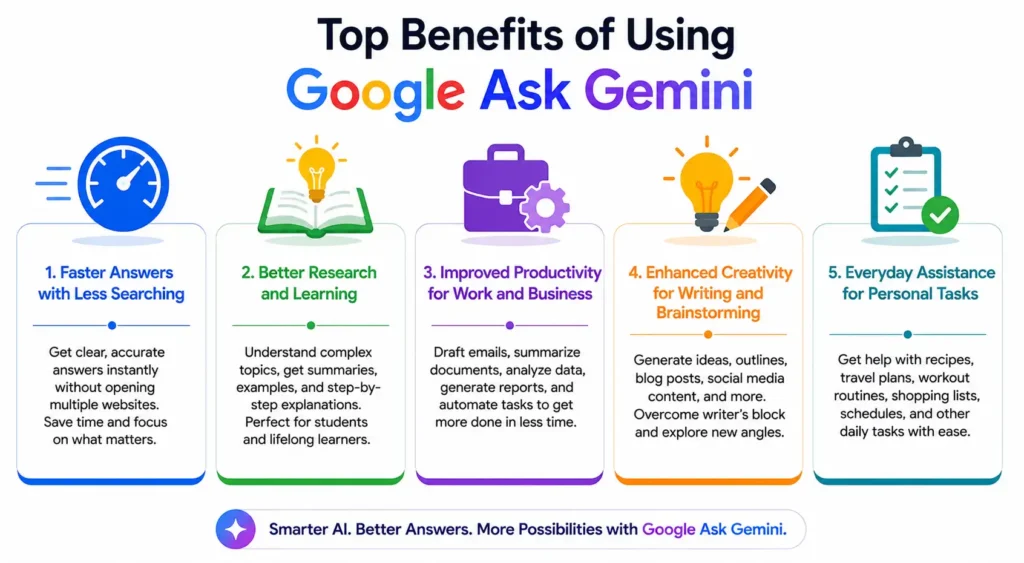
Google Ask Gemini offers far more than quick answers. It combines advanced AI reasoning with Google’s knowledge ecosystem to help users learn faster, work more efficiently, and complete everyday tasks with less effort. Whether you’re a student, business owner, marketer, developer, or casual user, Gemini adapts to different needs through conversational interactions. Its ability to understand context, generate creative content, analyze information, and support productivity makes it one of Google’s most valuable AI-powered tools for both personal and professional use.
Faster Answers with Less Searching
Instead of opening multiple websites to collect information, Gemini provides comprehensive answers within a single conversation. It summarizes complex topics, compares options, and explains ideas in plain language. Users spend less time searching through dozens of pages and more time focusing on learning or completing their work. This streamlined experience improves efficiency for both simple and advanced questions.
Better Research and Learning
Gemini helps students, professionals, and lifelong learners understand difficult subjects through simplified explanations, summaries, examples, and step-by-step guidance. It can organize research, explain technical concepts, generate study materials, and answer follow-up questions instantly. By combining AI reasoning with Google’s information ecosystem, Gemini makes learning more interactive, personalized, and accessible for users with different knowledge levels.
Improved Productivity for Work and Business
Professionals can use Gemini to draft emails, summarize meetings, organize documents, generate reports, create marketing ideas, write code, and automate repetitive tasks. Integration with Google Workspace further improves efficiency by assisting with Docs, Gmail, Drive, and other productivity tools. These capabilities reduce manual work and allow employees to spend more time on strategic decision-making and creative problem-solving.
Enhanced Creativity for Writing and Brainstorming
Gemini is a valuable creative partner for writers, marketers, designers, educators, and entrepreneurs. It can generate blog outlines, social media captions, advertising copy, business ideas, product descriptions, and storytelling concepts. Users can refine drafts through follow-up conversations, explore multiple perspectives, and overcome writer’s block faster while maintaining control over the final content.
Everyday Assistance for Personal Tasks
Beyond work, Gemini simplifies many daily activities. It can recommend recipes, create travel itineraries, explain health information in simple language, generate shopping lists, plan workouts, organize schedules, and answer general knowledge questions. Its conversational interface makes everyday problem-solving faster and more convenient, allowing users to complete routine tasks with minimal effort while receiving personalized suggestions based on their requests.
Frequently Asked Questions
Is Ask Gemini Free to Use?
Yes, Google offers a free version of Ask Gemini that allows users to chat with the AI, ask questions, generate text, summarize content, and perform many everyday tasks. However, Google also provides Gemini Advanced, a premium subscription included with Google AI Pro (and higher-tier AI plans where available). The paid version gives users access to Google’s more capable AI models, larger context windows, advanced reasoning abilities, deeper integrations with Google apps, and additional AI-powered features designed for professionals, creators, and businesses.
How Is Ask Gemini Different from Google Assistant?
Although both are Google AI products, they serve different purposes. Google Assistant primarily focuses on voice commands and device control, such as setting alarms, playing music, sending messages, and managing smart home devices. Ask Gemini is a generative AI assistant built for conversations, research, writing, brainstorming, coding, document analysis, and problem-solving. It understands context much better than Google Assistant and can generate detailed, human-like responses instead of simply executing commands.
Can Ask Gemini Replace Google Search?
Not completely. Ask Gemini is excellent for explaining concepts, summarizing information, generating ideas, and answering complex questions in a conversational format. However, Google Search remains the better option for finding official websites, breaking news, local businesses, product listings, academic research, and information that requires multiple independent sources. The most effective approach is to use both together—Search to discover reliable sources and Gemini to understand, organize, or expand on the information.
Which Devices Support Ask Gemini?
Google has made Gemini available across a wide range of devices. Users can access it through Android smartphones, iPhones, tablets, desktop and laptop browsers, and supported Chromebooks. Depending on your region and account, Gemini is also integrated into several Google services, including Gmail, Docs, Drive, and Workspace. Feature availability may vary based on your country, language, subscription plan, and device compatibility as Google continues expanding support worldwide.
Is My Data Safe While Using Ask Gemini?
Google includes several privacy controls to help users manage how their information is handled. Depending on your settings, Gemini conversations may be stored in your Google account to improve your experience and support product development. Users can review, export, or delete their Gemini activity through their Google account settings. If you connect Gemini with Google apps, you maintain control over those permissions and can disable them at any time. For sensitive or confidential information, it’s always wise to review Google’s latest privacy policies before sharing personal data.
Can Ask Gemini Generate Images and Code?
Yes. Gemini supports a wide variety of creative and technical tasks. It can generate and edit written content, assist with programming in popular languages such as Python, JavaScript, Java, C++, and SQL, explain code, debug errors, and help developers learn new concepts. Gemini can also generate AI images through supported Google AI image-generation features and assist with image understanding, making it useful for designers, marketers, students, and content creators.
Does Ask Gemini Work Offline?
No. Ask Gemini requires an active internet connection because it relies on Google’s cloud-based AI models and, in many cases, real-time web information. Without internet access, Gemini cannot process prompts or generate responses. While some basic on-device AI features exist within certain Google products, the full Ask Gemini experience depends on an online connection to access Google’s latest AI capabilities and services.
Is Gemini Advanced Worth Upgrading To?
Whether Gemini Advanced is worth the upgrade depends on how frequently you use AI. Casual users often find the free version sufficient for everyday questions and basic content generation. However, professionals, developers, researchers, students, and businesses may benefit from the premium plan’s more powerful AI models, improved reasoning, larger context window, higher usage limits, and enhanced productivity features. If AI plays an important role in your daily workflow, the upgrade can provide meaningful value.
What Are the Best Prompts to Use with Ask Gemini?
The best prompts are specific, detailed, and goal-oriented. Instead of asking, “Write about marketing,” try: “Write a 1,000-word beginner’s guide to digital marketing for small businesses using simple language and include practical examples.” You can also specify tone, audience, formatting, word count, or desired output. Clear instructions allow Gemini to understand your intent better and generate more accurate, relevant, and useful responses.
🎯 More Helpful Guides: Google Slides: Create Professional Presentations in 2026
Conclusion
Google’s Ask Gemini represents a major step forward in how people interact with artificial intelligence. Rather than simply helping users find information, it helps them understand, create, analyze, and complete tasks through natural conversations. With powerful multimodal capabilities, deep integration across Google’s ecosystem, and access to both free and premium AI models, Gemini has become a valuable assistant for students, professionals, businesses, and everyday users alike.
While it isn’t a complete replacement for traditional Google Search, Ask Gemini complements it by transforming complex questions into clear, personalized answers. As Google continues to improve its AI models and expand Gemini across more products and regions, users can expect even smarter, faster, and more personalized assistance. Learning how to use Ask Gemini effectively today will help you take full advantage of Google’s AI-powered future.
✨ Don’t miss tomorrow’s insight, follow Milyom today.