
What Is Google Shopping?
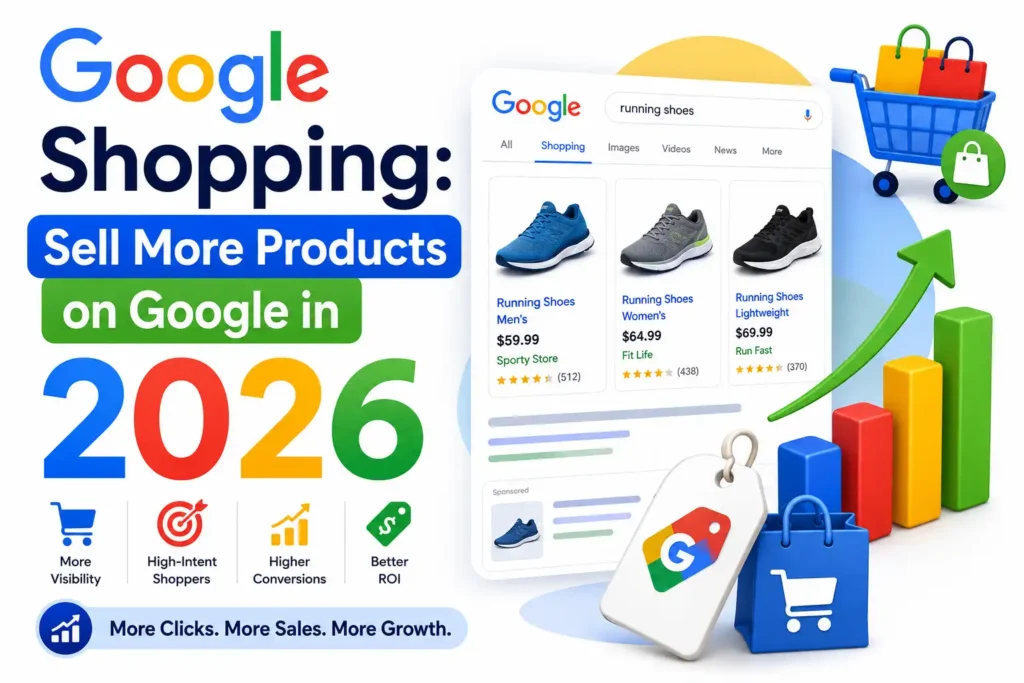
Google Shopping is Google’s product discovery platform that allows consumers to compare products, prices, brands, reviews, and retailers directly from Google search results. Instead of displaying only text-based advertisements, Google Shopping showcases visual product listings that include images, pricing, store information, and customer ratings. According to Google, billions of shopping-related searches occur every year, making Google Shopping one of the most powerful channels for e-commerce growth. Businesses can use both paid Shopping Ads and free product listings to reach potential customers.
How Google Shopping Ecosystem Work?
Google Shopping operates through a connected ecosystem that combines product data, advertising platforms, and machine learning technologies. Merchants submit product information through Google Merchant Center, which is then used to generate product listings across Google Search, Shopping, Images, YouTube, and other Google properties. Google Ads manages campaign delivery and bidding, while Performance Max uses automation to optimize visibility. The quality of product data significantly influences how products appear and perform. Understanding how each component works together is essential for maximizing visibility, improving click-through rates, and increasing online sales.
How to Set Up Google Shopping for Your Business
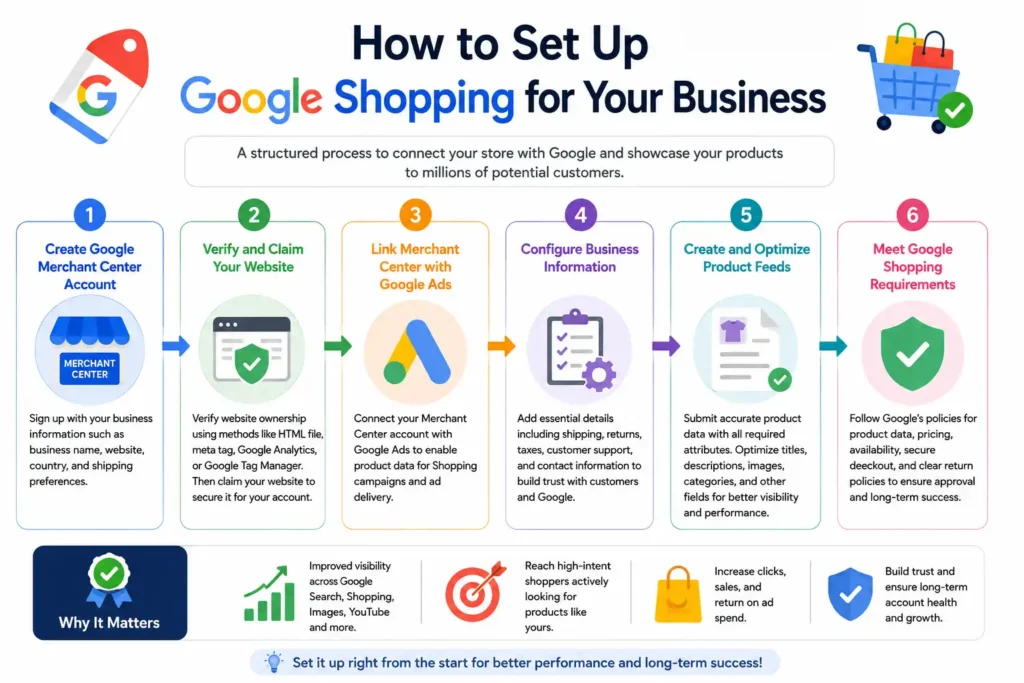
Setting up Google Shopping requires a structured process that ensures your products meet Google’s policies and data requirements. Businesses must first create a Google Merchant Center account, verify ownership of their website, and connect Merchant Center with Google Ads. Accurate business information and compliant product data are essential for approval. Once the setup is complete, products can become eligible for both free listings and paid Shopping campaigns. Taking the time to configure everything correctly from the beginning helps avoid account suspensions, feed disapprovals, and performance issues later.
Creating a Google Merchant Center Account
The first step is creating a Google Merchant Center account using your business information. During setup, you will provide details such as your business name, website, country, and shipping preferences. Google uses this information to verify your store and determine eligibility for Shopping features. Accurate information helps streamline the approval process.
Verifying and Claiming Your Website
Website verification confirms that you own the online store associated with your Merchant Center account. Google offers several verification methods, including HTML files, meta tags, Google Analytics, and Google Tag Manager. After verification, you must claim the website to connect it exclusively to your Merchant Center account and prevent ownership conflicts.
Linking Merchant Center with Google Ads
Connecting Merchant Center with Google Ads enables product data to be used in Shopping campaigns. Once linked, advertisers can create campaigns, set budgets, and manage bidding strategies directly within Google Ads. This integration allows Google to use product feed information for ad delivery and performance optimization across multiple channels.
Configuring Business Information
Business information settings include shipping policies, return policies, tax settings, customer support details, and contact information. Google evaluates these elements to ensure a trustworthy shopping experience for users. Providing complete and transparent information can improve account quality, increase customer confidence, and reduce the risk of policy-related issues.
Meeting Google Shopping Requirements
Google requires businesses to follow strict policies regarding product information, website functionality, and customer transparency. Products must have accurate pricing, valid availability status, secure checkout processes, and clear return policies. Regular compliance reviews help prevent product disapprovals and account restrictions while maintaining long-term visibility within Google Shopping.
💚 You Might Also Like: Google Slides: Create Professional Presentations in 2026
Creating and Optimizing Product Feeds
Since Google relies on feed data rather than keywords alone, every attribute should be accurate, detailed, and relevant. Optimized feeds improve product matching, increase visibility, and help attract qualified shoppers. Businesses that continuously refine product titles, descriptions, categories, and attributes often achieve better click-through rates and stronger return on ad spend. Effective feed management also reduces errors and ensures products remain eligible across Google’s shopping ecosystem.
Essential Product Feed Attributes
Key product feed attributes include product title, description, price, availability, image link, brand, GTIN, and product category. These fields help Google understand exactly what is being sold. Missing or inaccurate attributes can reduce visibility and lead to product disapprovals. Maintaining complete and accurate data improves overall Shopping performance.
Writing High-Converting Product Titles
Product titles are among the strongest ranking signals in Google Shopping. Effective titles clearly describe the product while incorporating important details such as brand, product type, size, color, and key features. Descriptive titles help Google better understand product relevance and improve the likelihood of matching high-intent customer searches.
Optimizing Product Descriptions
Product descriptions provide additional context that helps Google understand product relevance. Effective descriptions highlight features, benefits, specifications, and unique selling points while remaining easy to read. Including naturally relevant keywords can improve visibility without appearing overly optimized. Clear descriptions also help shoppers make informed purchasing decisions.
Using Product Categories and Attributes
Google product categories and attributes improve classification accuracy within the Shopping ecosystem. Proper categorization helps Google place products in relevant searches and compare them against similar items. Additional attributes such as size, material, color, gender, and condition provide further context, improving both visibility and user experience.
Common Product Feed Errors and Fixes
Common feed issues include missing product identifiers, inaccurate pricing, broken image links, and availability mismatches. These errors can lead to product disapprovals or reduced visibility. Regular feed audits and automated updates help identify problems before they affect performance. Maintaining feed accuracy ensures products remain eligible for Shopping placements.
Google Shopping Ads
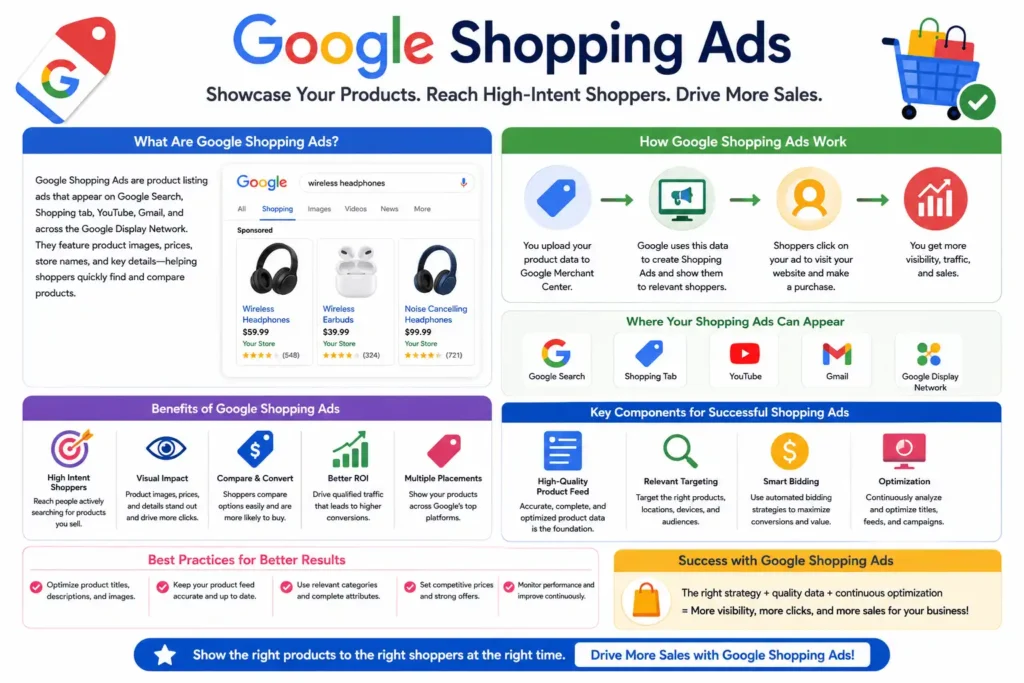
Google Shopping Ads are one of the most effective advertising formats for eCommerce businesses because they place products directly in front of shoppers with strong purchase intent. Unlike traditional text ads, Shopping Ads display product images, prices, ratings, and store names within search results, helping users compare options before clicking. Research from multiple digital marketing studies consistently shows that Shopping Ads often generate higher click-through rates than standard search ads due to their visual nature. When properly optimized, Google Shopping Ads can drive qualified traffic, increase conversions, and deliver a strong return on advertising investment.
Types of Shopping Campaigns
Google offers multiple Shopping campaign formats designed for different business objectives. The two primary options are Standard Shopping Campaigns and Performance Max Campaigns. Each campaign type uses product feed information but differs in automation, targeting capabilities, reporting, and optimization methods. Choosing the right campaign structure depends on advertising goals and budget.
Standard Shopping Campaigns
Standard Shopping Campaigns provide advertisers with greater manual control over bidding, campaign structure, and product segmentation. Businesses can organize products into specific groups and optimize bids based on performance data. This campaign type is often preferred by experienced advertisers who want detailed insights and more flexibility when managing product-level strategies.
Performance Max Campaigns
Performance Max Campaigns use Google’s artificial intelligence to automate bidding, targeting, and ad placements across multiple channels. The system analyzes audience signals, product data, and conversion history to maximize results. Many retailers use Performance Max because it simplifies campaign management while expanding product visibility beyond traditional search results.
Budgeting and Bidding Strategies
Successful Google Shopping campaigns require careful budget allocation and bidding strategies. Advertisers can choose from manual bidding or automated options such as Maximize Conversion Value and Target ROAS. Budget decisions should align with business goals, product margins, and competition levels. Continuous performance monitoring helps improve profitability and campaign efficiency over time.
💚 You Might Also Like: 5 Best Tools to Grow Your Business in 2026
Google Shopping SEO and Organic Product Listings
Google Shopping is no longer limited to paid advertising. Businesses can now gain visibility through free product listings that appear across Google’s shopping ecosystem. Organic Shopping optimization focuses on improving product data quality, pricing accuracy, availability, and relevance rather than relying solely on advertising spend. As Google continues expanding free shopping experiences, merchants that invest in strong product data often benefit from increased visibility and additional traffic opportunities. A well-optimized product feed can help products appear in relevant searches, attract qualified shoppers, and support long-term eCommerce growth without requiring continuous ad investment.
Free Listings in Google Shopping
Free listings allow businesses to showcase products on Google Shopping without paying for clicks. Merchants simply submit approved product data through Google Merchant Center and maintain compliance with Google’s policies. While visibility is not guaranteed, optimized product information significantly improves the likelihood of appearing in relevant shopping searches.
Ranking Factors for Organic Shopping Results
Google evaluates multiple factors when ranking products in organic search results. Product title relevance, detailed descriptions, pricing accuracy, availability, image quality, and overall feed health all influence visibility. Google’s algorithms also consider user intent and search relevance when determining which products appear for specific shopping-related queries.
Product Data Optimization Techniques
Optimizing product data involves improving titles, descriptions, categories, images, and product attributes. Detailed and accurate information helps Google understand products more effectively. Including important product details naturally within feed content improves relevance while increasing the chances of appearing in both paid and organic shopping placements.
Importance of Pricing and Availability
Accurate pricing and availability information directly affect product performance within Google Shopping. Shoppers expect current information, and discrepancies can lead to poor user experiences or product disapproval.
Improving Product Visibility Without Ads
Businesses can improve visibility without advertising by focusing on feed optimization, product accuracy, competitive pricing, and high-quality images. Earning positive customer reviews and maintaining complete product information also contribute to stronger performance. Consistent feed management helps products remain relevant and discoverable across free Shopping listings.
Advanced Google Shopping Optimization Strategies
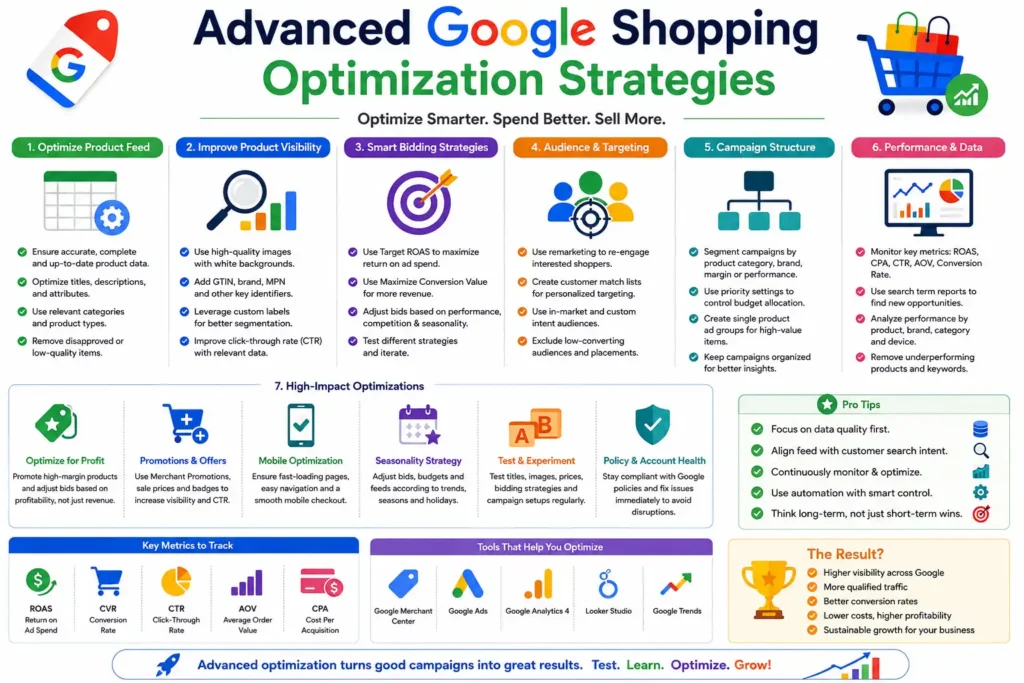
Product Segmentation Techniques
Product segmentation involves organizing products into meaningful groups based on category, brand, margin, seasonality, or performance. This allows advertisers to allocate budgets more strategically and optimize bids according to business priorities. Effective segmentation provides greater control over campaign performance while helping identify top-performing products more quickly.
Using Custom Labels Effectively
Custom labels allow merchants to categorize products using business-specific attributes that are not part of Google’s standard feed requirements. Common examples include best sellers, seasonal products, high-margin items, and promotional inventory. These labels help advertisers create more targeted bidding strategies and improve campaign organization.
Competitive Pricing Strategies
Pricing remains one of the strongest factors influencing Shopping performance. Consumers frequently compare prices before purchasing, making competitive pricing essential for maintaining visibility and conversions. Businesses should regularly monitor market trends, competitor pricing, and profit margins to balance competitiveness with long-term profitability.
Leveraging Product Reviews and Ratings
Product reviews and ratings help build trust while improving click-through rates. Research consistently shows that consumers are more likely to engage with products that display positive reviews and social proof. Encouraging customer feedback and maintaining high service standards can strengthen product credibility and increase conversion potential.
Audience Targeting and Remarketing
Audience targeting and remarketing help businesses reconnect with users who previously interacted with their products or website. These strategies allow advertisers to serve relevant product ads to highly interested shoppers. By focusing on users with existing purchase intent, remarketing campaigns often deliver stronger conversion rates and improved advertising efficiency.
Measuring Google Shopping Performance and ROI
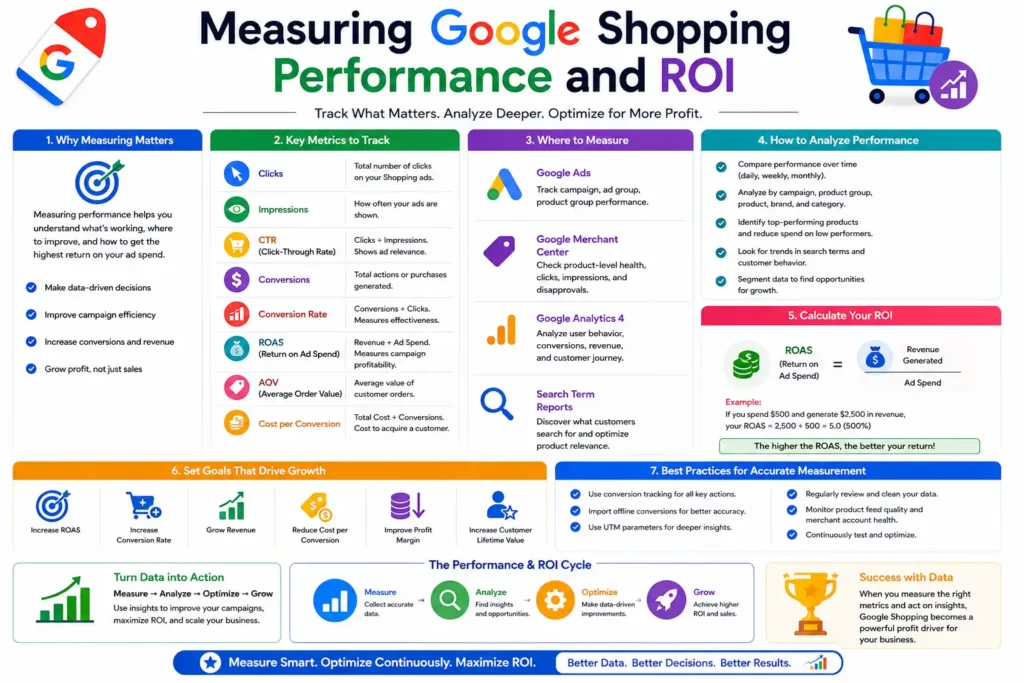
Important Metrics to Track
Several key performance indicators help measure Google Shopping success. These include impressions, clicks, click-through rate (CTR), cost per click (CPC), conversions, conversion rate, return on ad spend (ROAS), and total revenue. Tracking these metrics regularly provides valuable insights into campaign effectiveness and helps identify areas requiring optimization or strategic adjustments.
Understanding CTR, CPC, and ROAS
CTR measures how often users click on product listings after seeing them. CPC represents the average amount paid for each click. Together, these metrics help advertisers evaluate visibility, traffic quality, and profitability while determining whether campaigns are delivering acceptable business results.
Conversion Tracking Setup
Conversion tracking allows businesses to measure actions that occur after users click a Shopping ad. Common conversions include purchases, lead submissions, and sign-ups. Google Ads and Google Analytics can be integrated to provide accurate conversion reporting. Proper tracking ensures advertisers can attribute revenue correctly and optimize campaigns based on actual results.
Analyzing Product-Level Performance
Not all products perform equally within Google Shopping campaigns. Reviewing metrics such as clicks, conversions, revenue, and ROAS for individual products allows businesses to prioritize profitable inventory and improve campaign efficiency through data-driven decisions.
Scaling Successful Shopping Campaigns
Once profitable performance is achieved, businesses can scale campaigns by increasing budgets, expanding product coverage, testing new bidding strategies, and targeting additional audiences. Scaling should be gradual and supported by performance data. A structured growth approach helps maintain profitability while maximizing market reach and long-term revenue potential.
Frequently Asked Questions About Google Shopping
Is Google Shopping Free to Use?
Yes, Google Shopping offers free product listings through Google Merchant Center. Businesses can submit product data and potentially appear in organic search results without paying for clicks. However, paid Shopping Ads provide additional visibility and promotional opportunities. Many successful retailers combine free listings with paid campaigns to maximize exposure.
How Much Do Google Shopping Ads Cost?
There is no fixed cost for Google Shopping Ads. Advertisers set their own budgets and bidding strategies based on business objectives. Costs vary depending on competition, industry, product category, and target market. Businesses can start with modest budgets and gradually increase spending as campaign performance improves.
What Is the Difference Between Google Shopping and Google Ads?
Google Shopping is a product discovery platform that displays product listings, while Google Ads is the advertising platform used to manage and promote those listings. Merchant Center provides product data, Google Shopping displays products, and Google Ads controls campaign settings, budgets, bidding strategies, and advertising performance.
Can Small Businesses Succeed With Google Shopping?
Yes, small businesses can achieve strong results with Google Shopping. Success depends more on product quality, feed optimization, pricing competitiveness, and campaign management than on company size. Many smaller retailers effectively compete with larger brands by targeting niche products, optimizing data quality, and focusing on high-intent shoppers.
How much time is required to See Results From Google Shopping?
Results vary depending on product demand, competition, feed quality, and campaign optimization. Initial performance data often becomes available within a few days after launch. However, meaningful optimization insights typically require several weeks of data collection. Most businesses see more consistent results after ongoing testing and refinement.
💚 You Might Also Like: 5 Best Writing Tools in 2026 for Better Content
Conclusion
Google Shopping has become one of the most valuable channels for eCommerce businesses seeking to increase product visibility, attract qualified buyers, and drive online sales. Whether through free product listings or paid Shopping Ads, the platform provides multiple opportunities to reach consumers actively searching for products. Success depends on accurate product data, strategic campaign management, continuous optimization, and performance analysis. Businesses that invest in feed quality, competitive pricing, and customer experience are better positioned to achieve sustainable growth. With the right approach, Google Shopping can become a powerful driver of long-term eCommerce success.
✨ More clarity. More insights. Less noise. Follow Milyom.