
What is Google Search Console Webmaster Tools and why its Important?
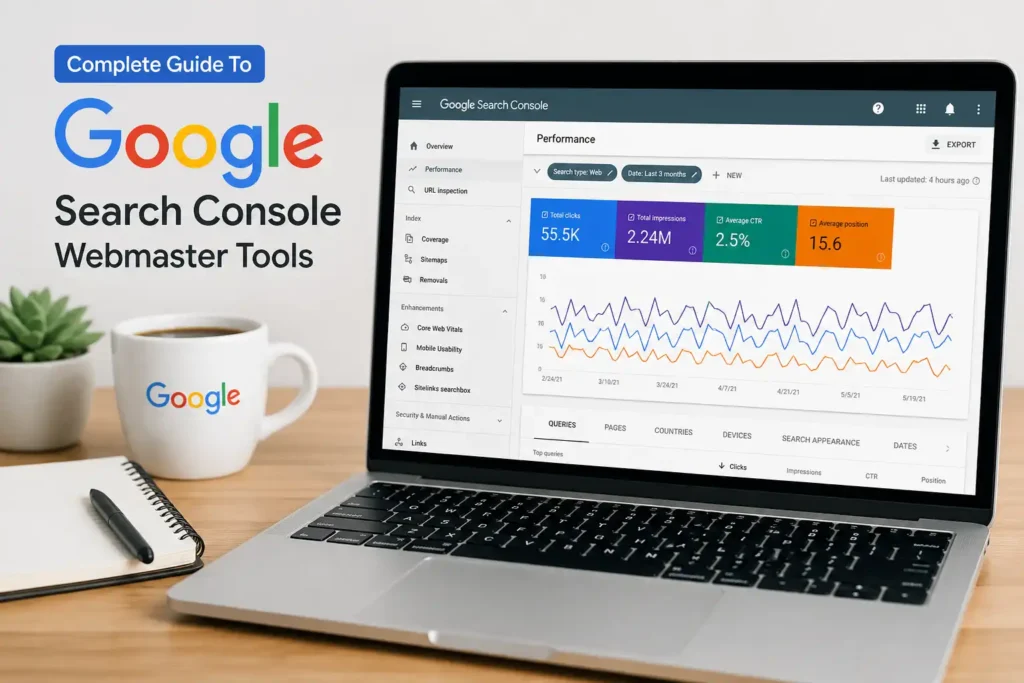
Google Search Console, previously known as Webmaster Tools, is a free platform that helps website owners monitor, maintain, and improve their presence in Google Search results. It provides direct insights into how Google crawls, indexes, and ranks your site. Introduced as Webmaster Tools in 2006 and rebranded in 2015, it evolved to support not only developers but also marketers and content creators. Today, it plays a central role in technical SEO and content optimization. According to industry research, over 80% of SEO professionals rely on Search Console data to make informed ranking decisions and improve visibility.
Google Search Console is essential because it gives you real performance data directly from Google, not estimates. You can track clicks, impressions, and keyword rankings, helping you understand how users find your site. It also highlights crawling and indexing issues, ensuring your pages appear in search results. Additionally, it identifies technical SEO problems like mobile usability errors and Core Web Vitals issues. Studies show that websites actively monitored through Search Console tend to resolve indexing issues 30% faster, which directly impacts search visibility and organic traffic growth over time.
How to Set Up Google Search Console (Step-by-Step Guide)
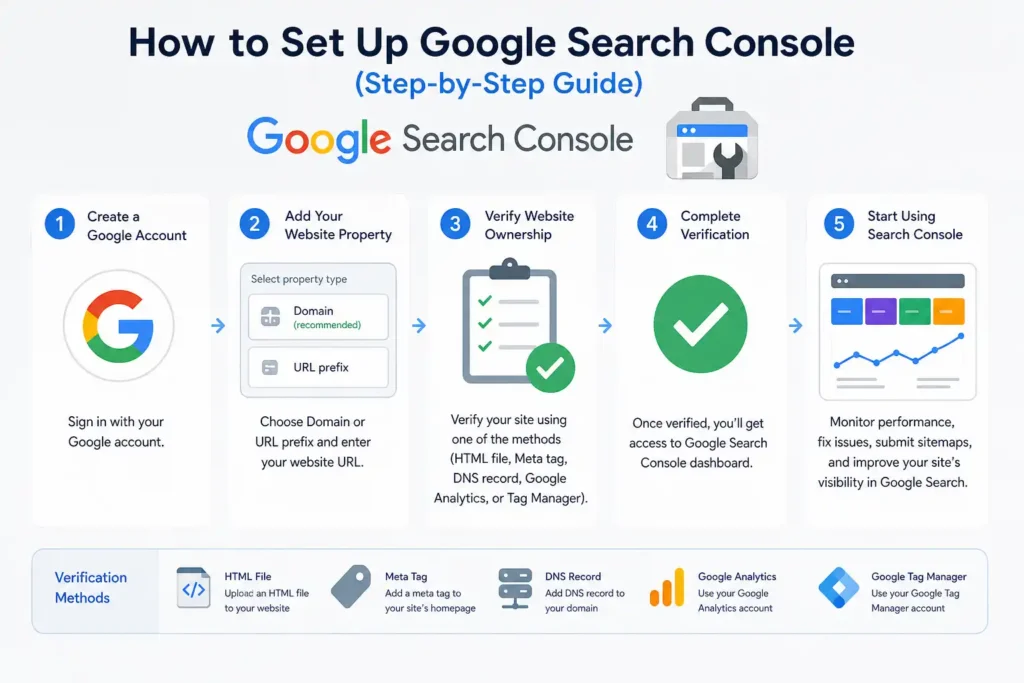
Setting up Google Search Console is straightforward but critical for accurate SEO tracking. First, sign in with your Google account and add your website as a property. You can choose between domain-level tracking or URL prefix tracking depending on your needs. After adding the site, you must verify ownership using one of several methods. Proper setup ensures data accuracy, which is essential for analyzing performance and fixing technical issues. Without verification, you won’t access search data, making optimization nearly impossible in competitive search environments today.
Creating a Google Search Console Account
To get started, visit the Google Search Console website and sign in using your Google account. If you already use tools like Google Analytics, you can use the same login. The process is quick and free. Once logged in, you’ll access the dashboard where you can begin adding properties and monitoring your website’s performance without needing advanced technical skills or coding knowledge.
Adding a Website Property
After logging in, the next step is adding your website as a property. You can choose between a domain property, which tracks all subdomains and protocols, or a URL prefix property, which tracks a specific URL version. Domain properties provide more comprehensive data, while the URL prefix is easier for beginners. Selecting the right option depends on your tracking goals and website structure.
Website Verification Methods
To confirm ownership, Google requires verification through methods like uploading an HTML file to your server, adding a meta tag to your site’s header, or verifying via DNS records. You can also use Google Analytics or Tag Manager if already installed. DNS verification is considered the most reliable, especially for domain-level tracking, as it confirms full control over the website.
💚 You might also like: Tools Like Ahrefs: Best SEO Alternatives 2026
Overview of Google Search Console Dashboard
The Google Search Console dashboard is designed to give you a clear snapshot of your website’s performance and health. It includes sections like Performance, Coverage, Experience, and Enhancements. The interface is user-friendly, allowing both beginners and experts to navigate easily. Each section provides actionable insights, from keyword rankings to technical errors. According to usability studies, dashboards with visual data representation, like Search Console, improve decision-making speed by up to 40%, helping users quickly identify issues and opportunities for optimization.
Understanding the Performance Report
The Performance Report is one of the most powerful features in Google Search Console. It shows how your site performs in search results through key metrics like clicks, impressions, CTR, and average position. You can analyze which keywords drive traffic and which pages perform best. This data helps refine your SEO strategy. Research indicates that optimizing content based on real query data can increase organic traffic by up to 20%, making this report essential for continuous growth and improvement.
Clicks, Impressions, CTR, and Average Position
These four metrics form the foundation of performance analysis. Clicks show how many users visited your site, while impressions indicate how often your pages appeared in search results. CTR measures how appealing your listing is, and average position shows ranking trends. Together, they help you identify opportunities to improve titles, meta descriptions, and content relevance for better engagement.
Keyword (Query) Analysis
Keyword analysis reveals the exact search terms users type before landing on your site. This helps you understand user intent and discover new content opportunities. By optimizing pages for high-impression but low-click queries, you can quickly improve traffic. Studies show that targeting long-tail keywords identified through Search Console can boost conversion rates significantly compared to generic keywords.
Page Performance Insights
This section highlights which pages drive the most traffic and which need improvement. You can compare performance across different pages to identify patterns. For example, pages with higher engagement often have better content structure and relevance. Improving underperforming pages based on this data can lead to noticeable ranking improvements within weeks.
Device and Country Data
Understanding where your audience comes from and which devices they use is crucial. This data helps optimize your website for mobile users and target specific regions. With over 60% of global searches coming from mobile devices, ensuring mobile optimization based on this data is essential for maintaining and improving rankings.
How to Use the URL Inspection Tool
This Tool helps you to check how Google sees the exact page of your website. You can see whether the page is indexed, identify crawling issues, and request indexing after updates. It also shows detailed information about page rendering and coverage status. This tool is especially useful for troubleshooting new or updated pages. SEO experts often use it to speed up indexing, which can reduce the time it takes for content to appear in search results from weeks to just days.
Coverage Report Explained (Indexing Status)
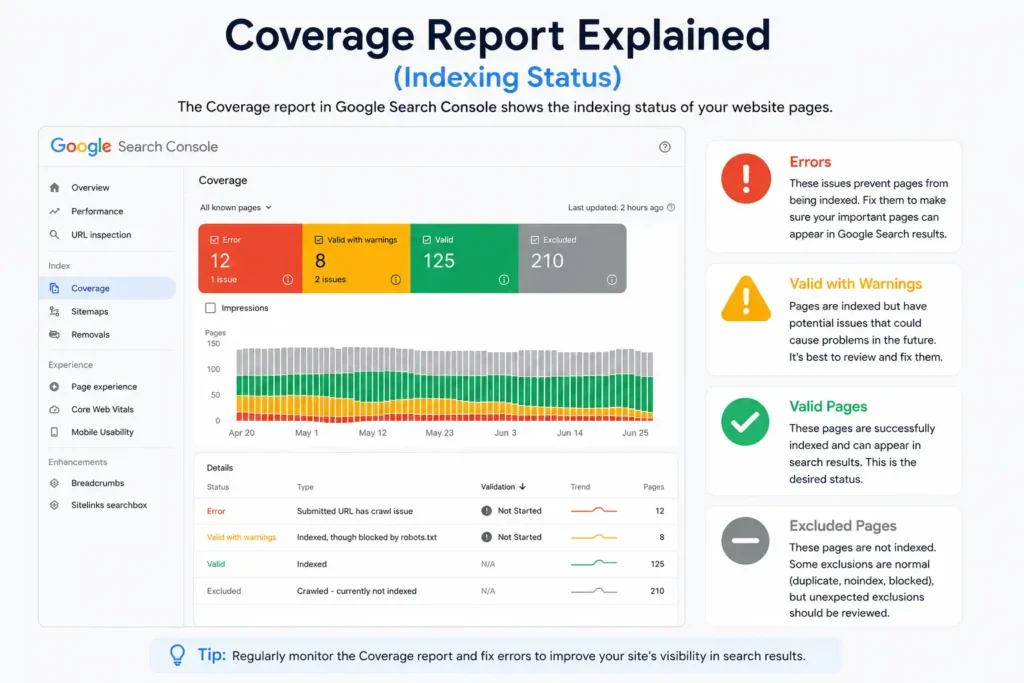
The Coverage Report helps you to see a complete overview of your website’s indexing status. It categorizes pages into errors, valid pages, and excluded URLs. This helps you identify which pages are successfully indexed and which need attention. Fixing coverage issues ensures that your important pages appear in search results. According to SEO case studies, resolving indexing errors can increase a website’s visibility by up to 25%, making this report a critical part of technical SEO management.
Errors
Errors indicate serious issues preventing pages from being indexed. These may include server errors, redirect issues, or blocked pages. Fixing these errors is crucial because affected pages will not appear in search results. Regular monitoring ensures that new errors are identified and resolved quickly, preventing long-term traffic loss.
Valid with Warnings
This category includes pages that are indexed but have potential issues. These warnings might not immediately affect rankings, but can cause problems over time. Addressing them improves overall site health and ensures long-term stability in search performance.
Valid Pages
Valid pages are successfully indexed and appear in search results. This is the desired status for important content. Monitoring these pages helps ensure they remain accessible and optimized. Any sudden drop in valid pages could indicate technical issues that need immediate attention.
Excluded Pages
Excluded pages are intentionally or unintentionally left out of indexing. This includes duplicate content, noindex pages, or blocked URLs. While some exclusions are normal, unexpected exclusions can harm SEO. Reviewing this section helps ensure that only the right pages are excluded from search results.
How to Submit and Manage Sitemaps
Submitting a sitemap in Google Search Console helps search engines discover and index your pages more efficiently, especially for large or newly launched websites. An XML sitemap acts as a roadmap, listing important URLs along with metadata like last updated dates. To submit it, you simply add your sitemap URL in the Sitemaps section of Search Console. Once submitted, Google regularly checks it for updates. If errors occur, such as invalid URLs or format issues, they should be fixed quickly. Studies show that properly maintained sitemaps can improve crawl efficiency by up to 30 percent.
💚 You might also like: Awius: Complete Guide to This Marketing Tool
Core Web Vitals and Page Experience
Core Web Vitals are a set of performance metrics that measure real user experience on your website, focusing on loading speed, interactivity, and visual stability. There are 3 main metrics, including Largest Contentful Paint, Cumulative Layout Shift, and First Input Delay. Google uses these signals as ranking factors, meaning better performance can improve rankings. Research from Google indicates that sites meeting Core Web Vitals thresholds see up to 24 percent lower bounce rates. Optimizing images, improving server response time, and minimizing layout shifts are essential steps to enhance overall page experience and user satisfaction.
Mobile Usability Report
The Mobile Usability Report in Google Search Console highlights issues that affect how your website performs on mobile devices. Common problems include text that is too small, clickable elements placed too close together, and content wider than the screen. With mobile traffic accounting for more than 60 percent of global web visits, having a mobile-friendly site is no longer optional. Fixing these issues improves user experience and search rankings. Google prioritizes mobile-first indexing, meaning it primarily uses the mobile version of your site for ranking and indexing purposes in search results.
Links Report (Backlink Analysis)
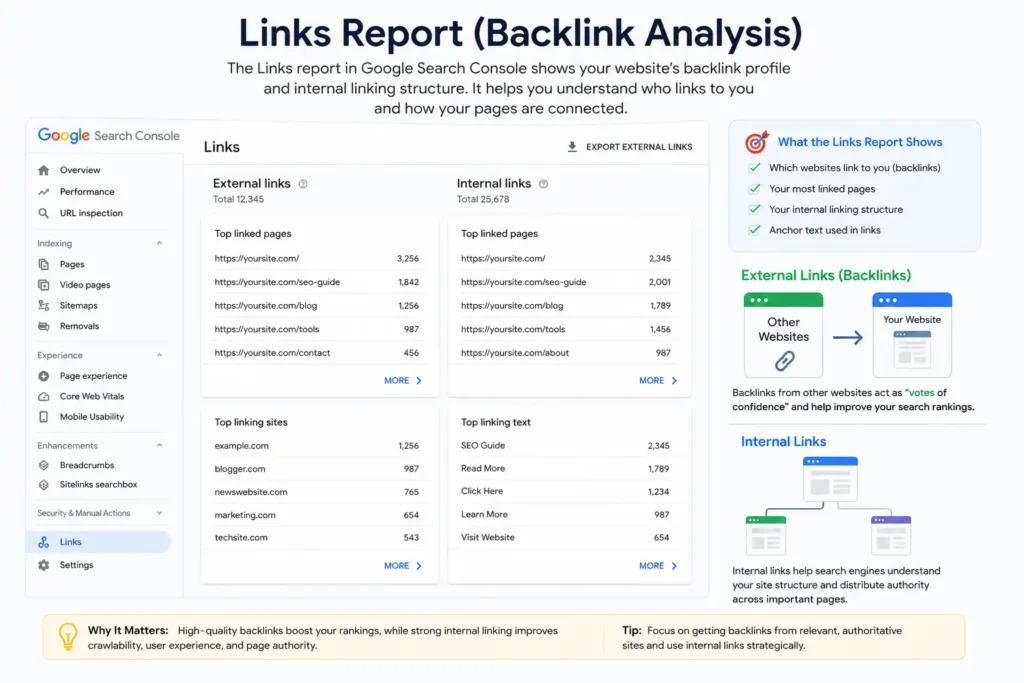
The Links Report provides valuable insights into your website’s backlink profile and internal linking structure. It shows which websites link to you and how your pages are interconnected. Backlinks remain one of the strongest ranking factors in SEO, as confirmed by multiple industry studies. Internal linking also plays a crucial role in distributing authority across your site. A well-structured linking strategy helps search engines understand your content better and improves overall visibility in search results.
External Links
External links refer to backlinks from other websites pointing to your site. These links work as votes of confidence, helping the search engines understand that your content is valuable and trustworthy. High-quality backlinks from top authoritative sites can helps you to boost rankings. Monitoring external links helps you identify strong sources and detect harmful links that may negatively impact your SEO performance over time.
Internal Links
Internal links connect different pages within your website, helping users navigate and discover related content. They also guide search engines in understanding your site structure and content hierarchy. Proper internal linking improves crawlability and distributes link equity across pages. Strategic use of anchor text can further enhance keyword relevance and boost rankings for important pages.
Manual Actions and Security Issues
Manual actions occur when Google reviewers determine that your site violates search guidelines, often due to spammy practices like unnatural backlinks or thin content. These penalties can significantly reduce your visibility in search results. Google Search Console alerts you to such issues and guides how to fix them. Security issues, such as malware or hacking, are also flagged. Addressing these problems quickly is essential, as compromised websites can lose user trust and rankings. Regular monitoring ensures your site remains compliant, secure, and optimized for long-term SEO success.
Common Google Search Console Errors and Fixes
Google Search Console helps identify common technical issues that can impact your website’s visibility. One frequent problem is “crawled but not indexed,” which indicates that Google accessed the page but chose not to index it, often due to low-quality content. Other issues include 404 errors and server problems. Fixing these errors ensures that your important pages remain accessible and visible in search results. Regular audits using Search Console can prevent long-term SEO damage and maintain consistent performance across your website.
💚 You might also like: Best Writing Tools for SEO, Bloggers & Students in 2026
Advanced Tips for SEO Experts
For advanced users, Google Search Console offers powerful features that go beyond basic analysis. You can use regex filters in the Performance Report to uncover detailed keyword patterns and user behavior. Integrating the Search Console API allows for automated data extraction and deeper analysis. Exporting data into tools like spreadsheets or BI platforms enables custom reporting and trend tracking. Advanced users often combine Search Console data with other analytics tools to create a comprehensive SEO strategy, leading to more precise optimization and better long-term results.
Google Search Console vs Other SEO Tools
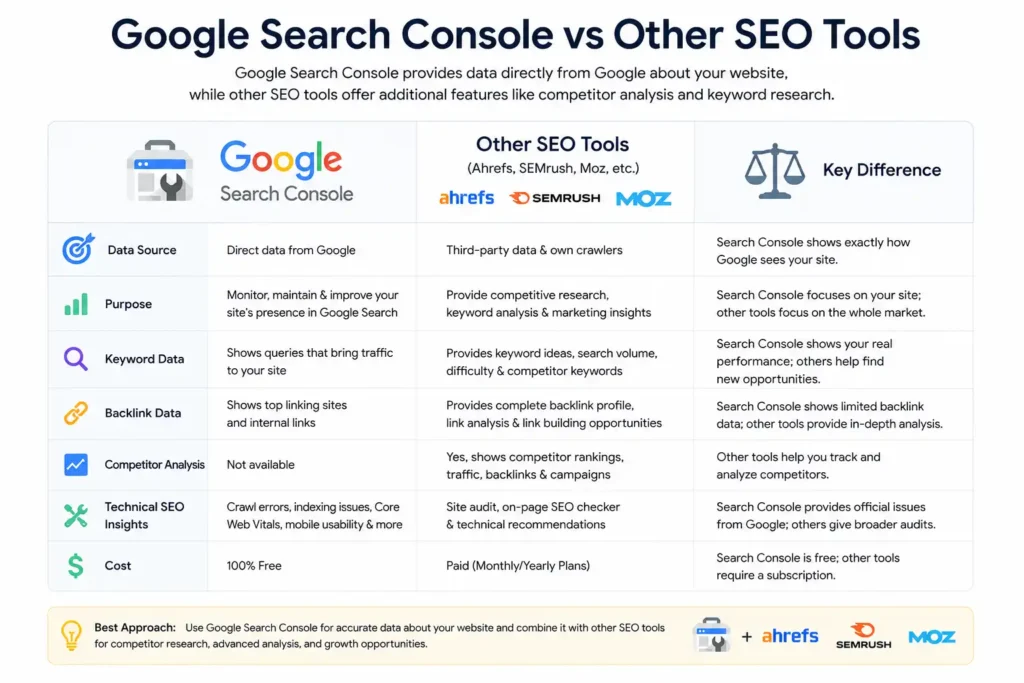
Google Search Console is a free tool that provides direct data from Google, making it highly reliable for tracking search performance. However, it has limitations compared to paid tools like Ahrefs and SEMrush, which offer advanced features such as competitor analysis and backlink tracking. While Search Console focuses on your own website data, paid tools provide broader market insights. Combining both can create a more effective SEO strategy. Many professionals use Search Console for accurate data and supplement it with premium tools for deeper analysis and competitive research.
Frequently Asked Questions
Is Google Search Console completely free to use?
Yes, Google Search Console is 100 percent free and available to anyone with a Google account. Despite being free, it provides highly accurate data directly from Google, making it one of the most reliable SEO tools for monitoring website performance, fixing issues, and improving search visibility over time.
How often does Google Search Console update its data?
Google Search Console data is usually updated within 24 to 48 hours, but some reports may take slightly longer depending on data processing. This delay means you are not seeing real-time data, but it is still accurate enough for SEO analysis. Regularly checking updates helps you track performance trends and identify issues early before they impact rankings significantly.
Do I need technical skills to use Google Search Console?
No, you do not need advanced technical skills to use Google Search Console. Beginners can easily understand basic features like performance reports and indexing status. However, some advanced features, such as fixing crawl errors or using structured data, may require basic SEO knowledge. Over time, users naturally become more comfortable with the tool and its functionalities.
Why is my website not showing in Google even after adding it to Search Console?
Adding your website to Google Search Console does not guarantee immediate indexing. Your site must be crawled and indexed first. This required time, a few days or even weeks. Issues like poor content quality, a missing sitemap, or technical errors can delay indexing. Using the URL Inspection tool and submitting a sitemap can help speed up the process.
What is the difference in clicks & impressions?
Impressions refer to how many times your website appears in search results, while clicks show how many users actually visited your site. A high number of impressions with low clicks may indicate that your title or meta description needs improvement. Optimizing these elements can increase your click-through rate and drive more traffic.
Can Google Search Console improve my rankings directly?
Google Search Console does not directly improve rankings, but it provides data and insights that help you optimize your website. By fixing errors, improving content, and targeting the right keywords, you can indirectly boost your rankings. It acts as a guide that helps you make better SEO decisions based on real performance data.
What is a sitemap, and why is it important?
A sitemap is a file that lists all the important pages on your website, helping search engines discover and index them efficiently. It is especially useful for large websites or new sites with few backlinks. Submitting a sitemap in Google Search Console ensures that your content is crawled more effectively and appears in search results faster.
How do I fix “Crawled but not indexed” issues?
This issue occurs when Google crawls a page but decides not to index it. Common reasons include thin content, duplicate content, or low value. To fix it, improve the content quality, ensure uniqueness, and add internal links pointing to that page. Once updated, you can request indexing again through the URL Inspection tool.
Is Google Search Console enough for SEO?
Google Search Console is essential but not always sufficient on its own. It provides accurate data about your website, but it lacks competitor insights and advanced keyword research features. Many SEO professionals combine it with tools like Ahrefs or SEMrush to get a complete picture and build a stronger, more effective SEO strategy.
Conclusion
Google Search Console remains one of the most essential tools for anyone serious about SEO and website performance. It provides accurate data, actionable insights, and powerful features to improve visibility in search results. From tracking performance to fixing technical issues, it covers every aspect of SEO. By using it consistently and strategically, you can enhance your website’s rankings, user experience, and overall growth. Whether you are a beginner or an expert, mastering Search Console is a crucial step toward achieving long-term success in digital marketing.
✨ Smart minds follow smart pages, hit follow on Milyom.